

A few years ago, dashboards felt advanced for organizations working with data. Being able to see data visualized felt like power in their hands. Teams could track revenue and follow KPIs in real time instead of relying on spreadsheets and static reports.
Unfortunately, the data needs to turn into information for the decision-makers. Typically dashboards are built, and no information is taken, then the dashboard is quickly forgotten into a closet of other ‘nice-to-haves’. The mindset towards BI has greatly evolved. Dashboards are not intelligent, they’re just line-cooks in the fast food chain - you cannot ask them to explain the company’s financials or operations, or even what’s inside the burger. They are not paid to do this - and although here at MPP Insights we love our burgers, we understand that BI has strayed far from the intended purpose - to make the business decisions with conviction.
In 2026, expectations are finally evolving. AI is now part of everyday workflows, and people expect faster answers and decisions. For this reason, traditional dashboard euphoria is a painting that doesn’t tell a story.
AI models, LLMs, and AI agents are starting to add a new, intelligent layer on top of traditional BI systems. Instead of only showing charts and metrics, AI-driven analytics systems can now generate explanations or recommendations automatically. It's called agentic BI, also known as agentic analytics.
So what is agentic workflow architecture for BI? In this blog, we break down what agentic workflow architecture is, how it works inside a BI system, and what it means for businesses that want to move beyond traditional reporting.
What Is Agentic BI?
Agentic BI is a BI setup where AI agents do the analysis for you. You delegate a task in plain language, and the agents investigate your data, run the analysis, and bring back an answer. You may also see it called agentic analytics.
A BI agent is an AI assistant that works on your behalf inside your BI environment. You give it a task. It investigates the data, runs the analysis, and can build or update dashboards.
Most agentic BI systems use several agents. Each one has a single job and its own written instructions, so it stays focused on that task.
Traditional vs Agentic BI
Because Agentic BI builds on the basics of traditional BI. If you want a quick refresher on what is business intelligence, we cover it in a separate guide.
Traditional BI Architecture
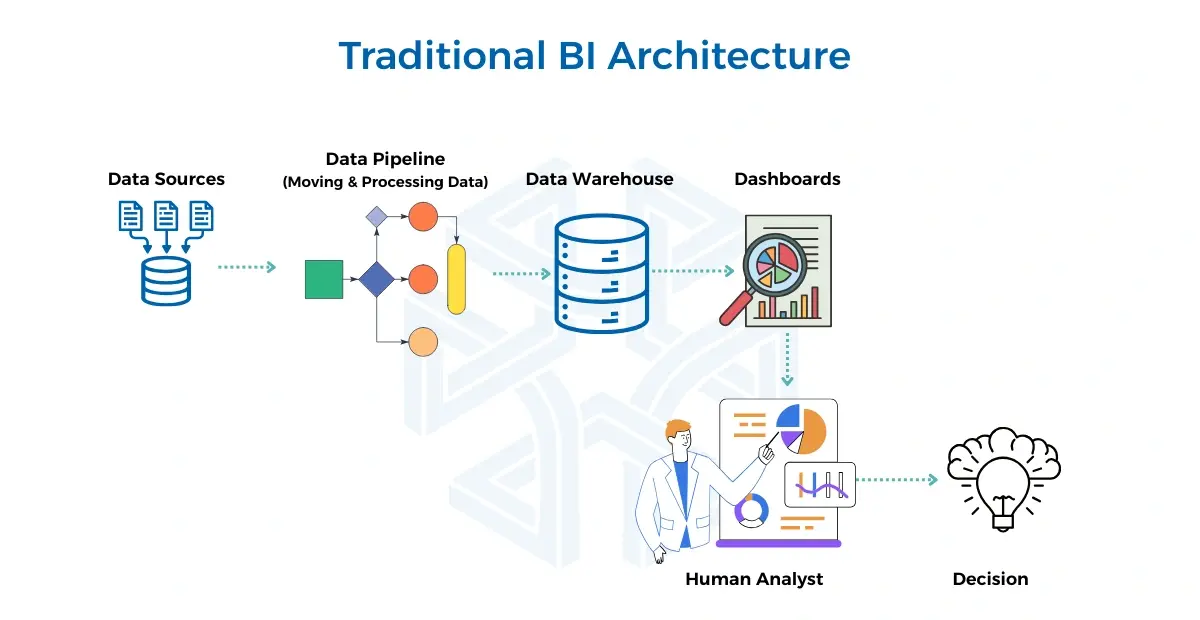
Traditional BI systems follow a simple flow. In this setup, data is collected, processed, and shown in dashboards. After that, people analyze it and decide what to do.
What Makes Agentic BI Different from Traditional BI?
With traditional BI tools, you open a dashboard, search for the right report, or write a query. If the answer is not there, you ask an analyst and wait for them to look into it. With agentic BI, you delegate the digging by describing what you need in natural language, and the agents take it from there. They use your data, your business definitions, and the instructions they were given.
- Traditional BI shows you what happened, but agentic BI explains why and tells you what to do next.
- Traditional BI requires manual work, and a human analyst pulls data, compares reports, and makes decisions. In agentic BI, the system does that work automatically.
- Traditional BI is static, so you get fixed dashboards and pre-built reports. Agentic BI responds to your questions in natural language and builds what you need on demand.
- In agentic BI, you don’t click around or configure anything manually. You ask a question, and agents collect the right data, analyse it, and deliver the answer.
- Agentic BI uses specialised agents for different tasks. Some agents collect data from databases, APIs, or spreadsheets. Others reason over that data. Others build the output. They work together automatically.
- Agentic BI learns and improves. After each task, the system logs what it did and how well it worked.
Understanding Agentic BI: How It Works and What It Can Do
Agentic BI Architecture
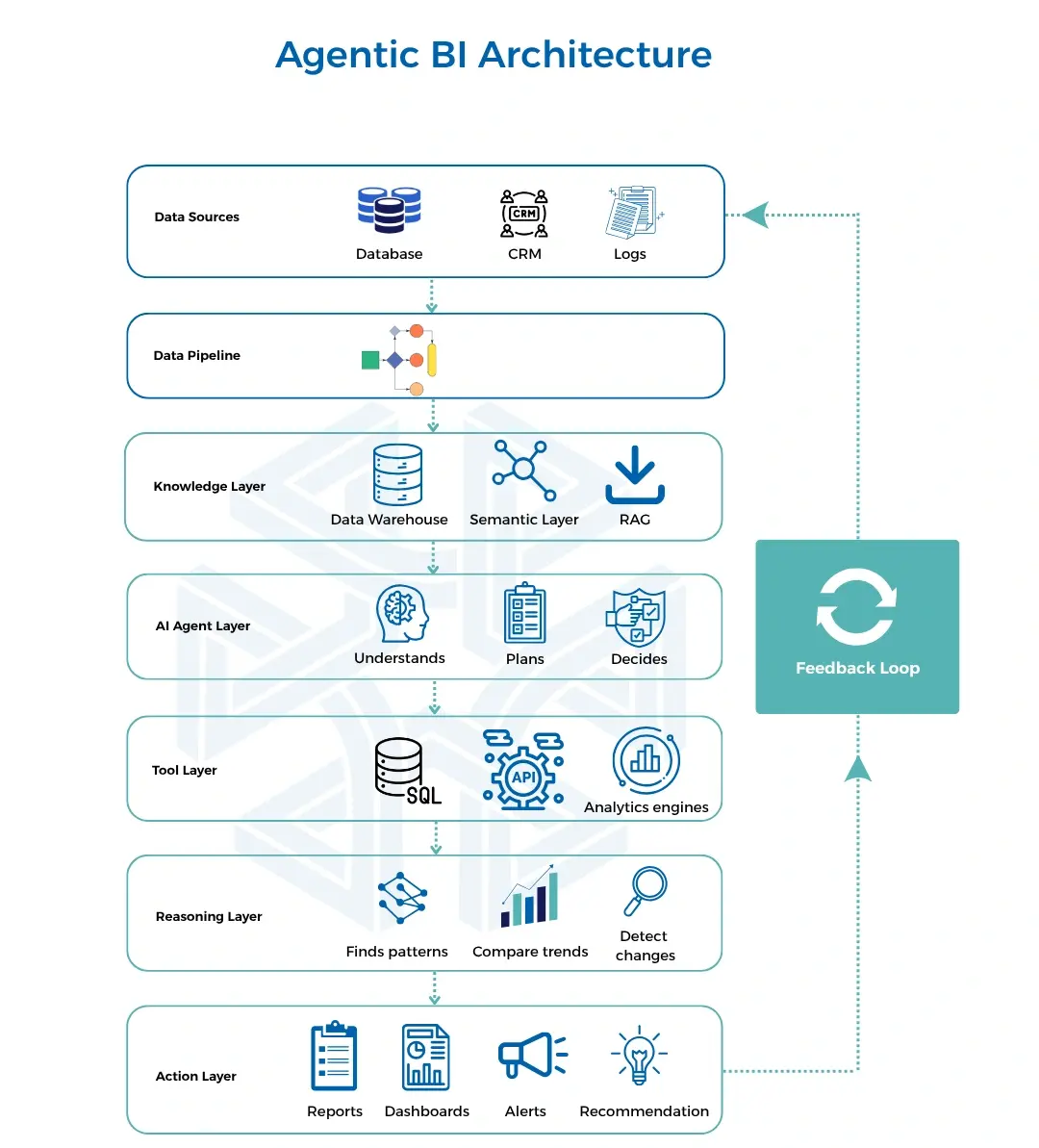
To understand how an agentic BI system works, it’s best to see the Agentic BI architecture.
Layers of an Agentic BI System
Data Sources
Raw data exists in multiple places, including
- databases;
- CRM and ERP systems;
- application data;
- logs and events.
Data Pipelines
Data pipelines move data from source systems into a central place. They clean and structure it so it is ready for analysis.
Knowledge Layer
The knowledge layer makes sure the agent understands your data the way your business understands it, not just the way a database stores it.
It does this through three components working together.
- Data warehouse: All the cleaned, structured data is stored in one central place called data warehouse and it’s ready to use.
- Semantic layer: It takes technical field names and database jargon and maps them to the business terms that your team uses. Words like "revenue" or "active users" are defined here so the agent and the human are always talking about the same thing.
- RAG: It stands for retrieval-augmented generation, a method for searching through documents.This lets the agent pull meaning from unstructured sources like PDFs, reports, and written documents.
AI Agent Layer (the orchestrator)
This is where the system becomes “agentic”, because this layer:
- understands the question;
- plans what needs to be done;
- decides which tools and data to use.
This process of coordinating all the layers is what people in the industry call orchestration. The AI agent layer is the orchestrator.
Tool Layer
The agent uses some tools to get real answers from data, it includes:
- SQL queries;
- APIs;
- analytics engines;
- external systems.
Reasoning Layer
This is where the system analyzes the data. It:
- finds patterns;
- compares trends;
- detects changes;
- connects signals across systems.
Action Layer
This is the output of the system. It can include:
- reports;
- alerts;
- dashboards updates;
- recommendations;
- automated workflows.
Multi-agent BI systems
More advanced agentic BI systems use multiple agents working together. Each agent specialises in a different area of the business. An orchestrator agent coordinates them, combining their findings into a single answer.
This makes it possible to answer complex, cross-functional questions much faster.
Is a BI Chatbot the Same as an Agentic BI?
One thing worth clarifying: a BI platform with an AI chatbot is not the same as agentic BI. The difference is significant.
Most BI chatbots connect to a third-party LLM and send your data to it. They work on top of existing dashboards, have limited capabilities, and don’t support follow-up questions. That is not an agentic BI. It is closer to traditional BI with a chat interface added on top.
What Makes an Agentic BI System Work
The layers earlier in this guide show the whole system, from your data to the final action. This section zooms in on one agent. Both views describe the same system. The tool layer holds the tools the agent uses. The knowledge layer supplies much of what the agent remembers. The AI agent layer is where the model and harness plan and coordinate the work. Governance has no layer of its own, because it applies to all of them.
In short, an agent has a model, a harness that holds its tools, memory, and skills, and governance around it. A person oversees the results.
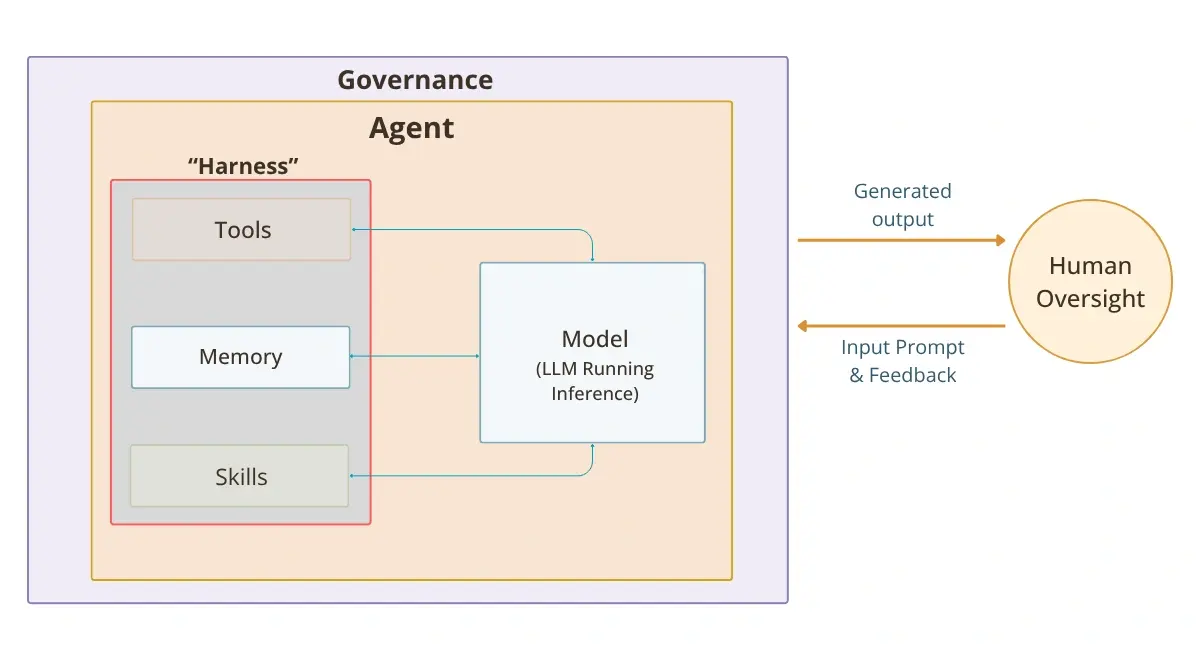
Model: the AI that understands your request
The model reads your request, works out what you mean, and decides how to approach the job. Most models used today are LLMs, the same kind of AI behind popular chat assistants.
Tools: how the agent reaches your data
Tools connect the agent to the systems around it. A tool can be a database connection, an API (a way for two software systems to talk to each other), or another service the agent needs to finish the task.
Memory: context that carries over
Memory holds background about your data and your earlier questions. You do not have to explain the basics each time you delegate something new.
Skills: a playbook for each task
Skills are written playbooks for specific jobs. Each one lists the steps for a task, much like the checklists your analysts already use. The agent follows those steps instead of guessing.
Harness: what holds it together
The harness links the model to its tools, memory, and skills. It gives the agent a place to actually do the work. Without it, a model could talk about a task but could not carry it out.
Governance: the limits you set
Governance decides what an agent can see and what it can do. Those rules cover the model, the tools, the memory, and the skills. This is what makes delegation safe. The agent has room to work, but only inside the limits you set.
Agentic BI Workflow Diagram
Here is how these parts connect in a real setup. The diagram below shows MPP BI, our BI platform.
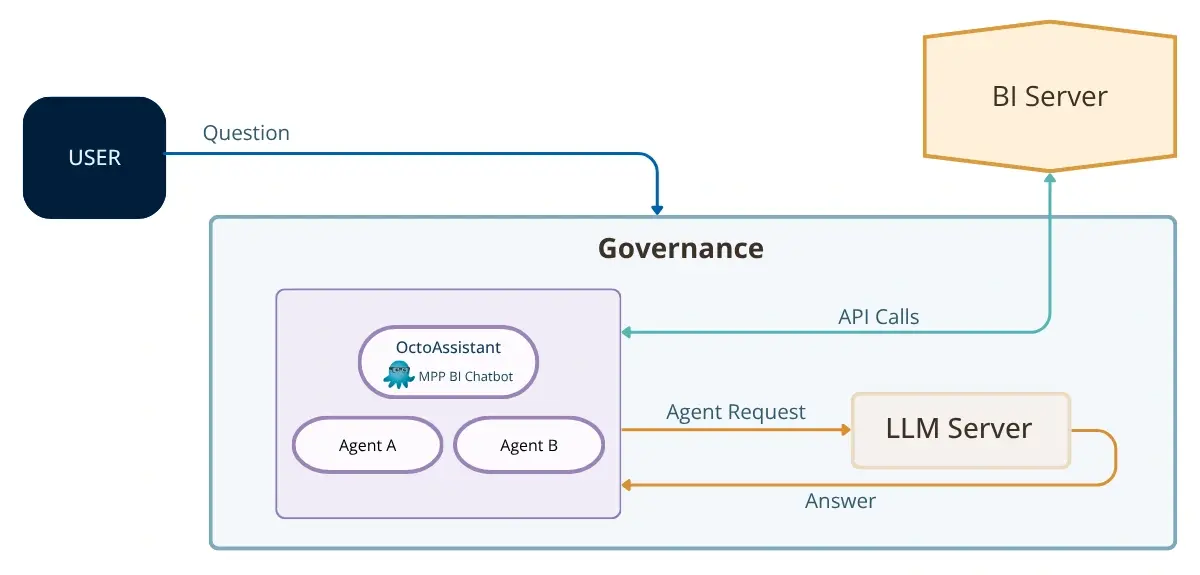
How we approach BI at MPP
Agentic BI is the future capital of companies - it’ll understand the context of the business through its documents, processes, etc. and then work across your entire ecosystem to build an intelligent business. Humans are there every step of the way - or what we believe as ‘High Tech, High Touch” to ensure the results are auditable, accurate, and realistic.
MPP Insights is working on R&D for Agentic BI in our Yerevan Office. We believe that the technology has promising capabilities and we’re excited to hopefully integrate our entire ecosystem of products - including MPP BI, Lizardata (MPP ETL), and our Digital Archive platform for a true data experience built on better architecture.
The architecture we covered in this blog is not a fixed template. It is a set of capabilities. We help you decide which ones make sense for your environment, your team, and your data.
To learn more about specific features and pricing, we can arrange a 30-minute discovery call to understand your business and what the right setup looks like for you.